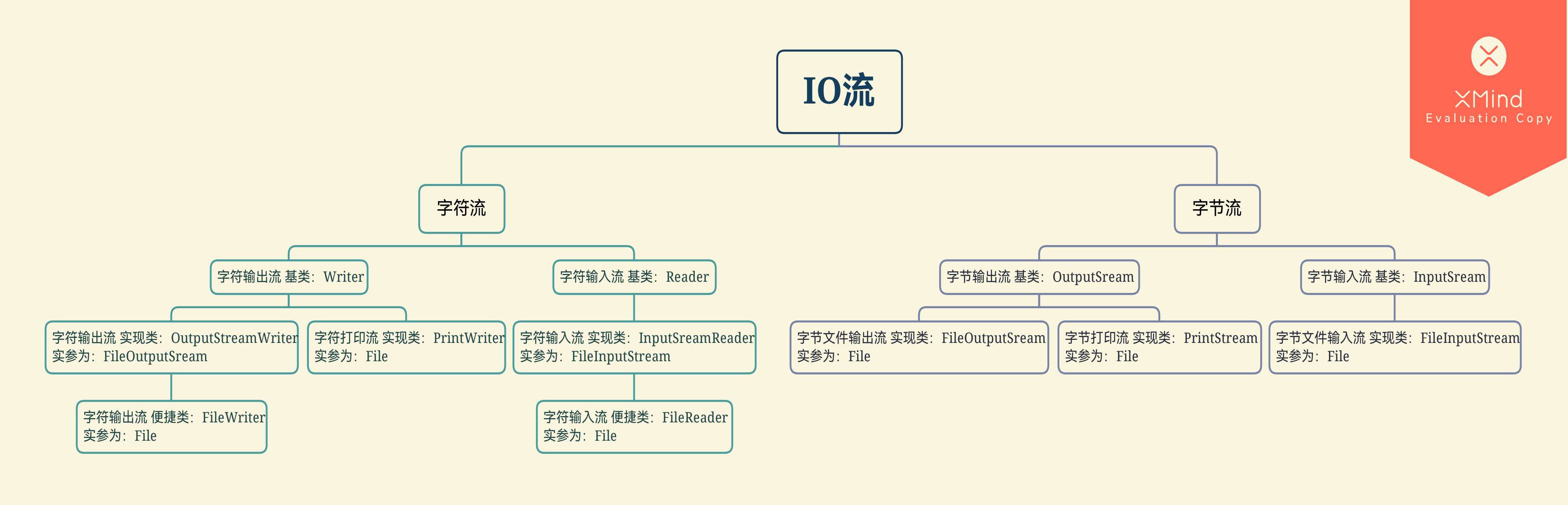
案例
案例:复制单极文件夹
1
2
3
4
5
6
7
8
9
10
11
12
13
14
15
16
17
18
19
20
21
22
23
24
25
26
27
28
29
30
31
32
33
34
| public class Demo07 {
public static void main(String[] args) throws IOException {
File srcFolder = new File("E:\\xiaobai");
String srcFolderName = srcFolder.getName();
File destFoldername = new File(srcFolderName);
if (!destFoldername.exists()) {
destFoldername.mkdir();
}
File[] listFiles = srcFolder.listFiles();
for (File srcFile : listFiles) {
String srcFileName = srcFile.getName();
File destfile = new File(destFoldername, srcFileName);
copyFile(srcFile, destfile);
}
}
private static void copyFile(File srcFile, File destfile) throws IOException {
BufferedInputStream bis = new BufferedInputStream(new FileInputStream(srcFile));
BufferedOutputStream bos = new BufferedOutputStream(new FileOutputStream(destfile));
byte[] by = new byte[1024];
int len;
while ((len = bis.read(by)) != -1) {
bos.write(by, 0, len);
}
bis.close();
bos.close();
}
}
|
案例:复制多级文件夹
1
2
3
4
5
6
7
8
9
10
11
12
13
14
15
16
17
18
19
20
21
22
23
24
25
26
27
28
29
30
31
32
33
34
35
36
37
38
| public class Demo08 {
public static void main(String[] args) throws IOException {
File srcFile = new File("E:\\xiaobai");
File destFile = new File("F:\\");
copyFolder(srcFile, destFile);
}
private static void copyFolder(File srcFile, File destFile) throws IOException{
if (srcFile.isDirectory()) {
String srcFileName = srcFile.getName();
File newFolder = new File(destFile, srcFileName);
if (!newFolder.exists()) {
newFolder.mkdir();
}
File[] fileArray = srcFile.listFiles();
for (File file : fileArray) {
copyFolder(file,newFolder);
}
}else {
File newFile = new File(destFile, srcFile.getName());
copyFile(srcFile,newFile);
}
}
private static void copyFile(File srcFile, File file) throws IOException {
BufferedInputStream bis = new BufferedInputStream(new FileInputStream(srcFile));
BufferedOutputStream bos = new BufferedOutputStream(new FileOutputStream(file));
byte[] by = new byte[1024];
int len;
while ((len = bis.read(by)) != -1) {
bos.write(by, 0, len);
}
bis.close();
bos.close();
}
}
|
复制文件的异常处理
利用try catch处理
1
2
3
4
5
6
7
8
9
10
11
12
13
14
15
16
17
18
19
20
21
22
23
24
25
26
27
28
29
30
31
32
33
| public class Demo09 {
public static void main(String[] args) {
BufferedReader br = null;
BufferedWriter bw = null;
try {
br = new BufferedReader(new FileReader("br.txt"));
bw = new BufferedWriter(new FileWriter("br.txt"));
String line;
while ((line = br.readLine()) != null) {
bw.write(line);
bw.newLine();
bw.flush();
}
} catch (IOException e) {
throw new RuntimeException(e);
} finally {
if (br != null) {
try {
br.close();
} catch (IOException e) {
throw new RuntimeException(e);
}
}
if (bw != null) {
try {
bw.close();
} catch (IOException e) {
throw new RuntimeException(e);
}
}
}
}
}
|
JDK7改进方案
在JDK7更新了try catch的新用法,格式为
1
2
3
4
5
| try(定义流对象){
可能出现异常的代码
}catch(异常类名 变量名){
异常的处理代码
}
|
像是如上操作,不需要使用finally释放资源,会自动释放资源
1
2
3
4
5
6
7
8
9
10
11
12
13
14
15
| public class Demo09_1 {
public static void main(String[] args) {
try (BufferedWriter bw = new BufferedWriter(new FileWriter("bw.txt"));
BufferedReader br = new BufferedReader(new FileReader("br.txt"));) {
String line;
while ((line = br.readLine()) != null) {
bw.write(line);
bw.newLine();
bw.flush();
}
} catch (IOException e) {
e.printStackTrace();
}
}
}
|
JDK9的改进方案
在这里,JDK9的方案就是把JDK7方案中的try()里面的定义拿到外面去做定义,但会出现方法仍需抛出异常的问题,所以JDK7的方案更靠谱一些