Vue-视图渲染技术
Vue是一种基于HTML的模板语法,使我们能够声明式的将其组件实例的数据绑定到呈现的DOM上
Vue会将模板编译成高度优化的JavaScript,将.vue文件编译出html+css+js的过程就是渲染
结合响应式系统,当应用状态变更时,Vue能够智能地推断出需要重新渲染的组件的最少数量,并应用最少的Dom操作
个人理解就是将变量给到元素的文本,变量给到元素的属性
插值表达式
个人感觉,${}的作用,在模板字符串中可获得变量内容进行拼接,在JSP中作为EL表达式获取值,插值表达式也能与他俩作类比
语法格式:NaN
- 插值表达式不依赖标签,可以单独使用
- 插值表达式可以调用函数,渲染该函数的返回值
- 插值表达式支持一些常见的运算符
- 插值表达式支持对象调用其API,渲染其返回值
1
2
3
4
5
6
7
8
9
10
11
12
13
14
15
16
17
18
19
20
21
22
23
24
25
26
27
28
29
30
31
32
33
34
35
| <script setup>
let msg = "hello vue3";
let getMsg = () => {
return "hello vue3 message";
};
let age = 18;
let bee = "蜜 蜂";
let carts = [
{ name: "可乐", price: "3", number: "10" },
{ name: "薯片", price: "6", number: "8" },
];
function computer() {
let count = 0;
for (let index in carts) {
count += carts[index].price * carts[index].number;
}
return count;
}
</script>
<template>
<div>
<h1>{{ msg }}</h1>
{{ getMsg() }}
{{ age > 18 ? "是" : "否" }}
{{ bee.split(" ").reverse().join(" ") }}
{{ carts[0].price * carts[0].number + carts[1].price * carts[1].number }}
{{ computer() }}
</div>
</template>
<style scoped>
</style>
|
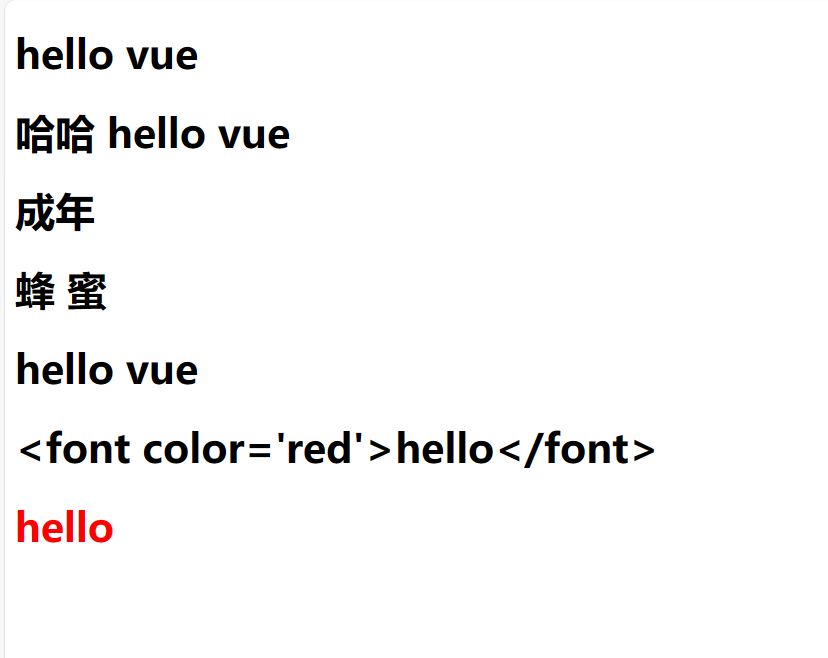
v-text&v-html 文本渲染命令
与插值表达式不同,v-xxx 为vue的指令
- 命令必须依赖标签,作为标签的属性存在
- 命令支持模板字符串吗,作为v-text的值直接使用
- 命令支持常见的运算符,作为v-text的值直接使用
- 命令支持常见的API的调用,作为v-text的值直接使用
- 命令支持函数的调用
v-text和v-html的区别就是:v-text不能识别html文本,但v-html可以识别
就如同Dom编程中的innerText和innerHTML
1
2
3
4
5
6
7
8
9
10
11
12
13
14
15
16
17
18
19
20
21
22
23
24
25
26
| <script setup>
let msg = "hello vue";
let age = 19;
let bee = "蜜 蜂"
let getMsg = ()=>{
return msg;
}
let fontMsg = "<font color='red'>hello</font>"
</script>
<template>
<div>
<h1 v-text="msg"></h1>
<h1 v-text="`哈哈 ${msg}`"></h1>
<h1 v-text="age > 18 ? '成年' : '未成年'"></h1>
<h1 v-text="bee.split(' ').reverse().join(' ')"></h1>
<h1 v-text="getMsg()"></h1>
<h1 v-text="fontMsg"></h1>
<h1 v-html="fontMsg"></h1>
</div>
</template>
<style scoped>
</style>
|
v-bind 属性渲染命令
v-bind:属性名 来绑定属性
可以简写成 :属性名 的方式绑定属性
1
2
3
4
5
6
7
8
9
10
11
12
13
14
15
16
17
18
| <script setup>
const data = {
logo: "http://8.210.71.55:8090/upload/QQ%E5%9B%BE%E7%89%8720220921142622.jpg",
name: "xiaobailogo",
url: "http://8.210.71.55:8090",
};
</script>
<template>
<div>
<a :href="data.url">
<img :src="data.logo" :title="data.name" />
</a>
</div>
</template>
<style scoped>
</style>
|
v-on 事件渲染命令
v-on:事件名称 = “函数名()”
可以简写成 @事件名称=”函数名”
原生js的事件名称是:onclick、ondbclick、onblur、onfocus
在vue中绑定事件时,去掉on前缀:click、dbclick、blur、focus
内联事件处理器
在vue进行事件渲染时,事件执行函数可直接写到@事件名称的属性中去,这称之为内联事件处理器
注:经过ref修饰的变量在script中需要通过.value获取操作其值,而在template中不需要.value
1
2
3
4
5
6
7
8
9
10
11
12
13
14
15
16
17
18
19
20
21
22
23
24
| <script setup>
import { ref } from "vue";
let fun = () => {
alert("hello");
};
let count = ref(1);
let fun2 = () => {
count.value++;
};
</script>
<template>
<div>
<button @click="fun()">say hello</button>
<button @click="fun2()">+</button>
<button @click="count++">+</button>
{{ count }}
</div>
</template>
<style scoped>
</style>
|
事件的修饰符
通过 @事件名称.修饰符:函数名()的方式 ,给事件加修饰符
- once:事件只执行第一次,执行后失效
- prevent:阻止组件的默认行为
1
2
3
4
5
6
7
8
9
10
11
12
13
14
15
16
17
18
19
20
21
22
| <script setup>
let fun3 = (event)=>{
let flag = confirm("确定要访问目标链接吗")
if(!flag){
event.preventDefault()
}
}
let fun4 = ()=>{}
</script>
<template>
<div>
<a href="http://8.210.71.55:8090" @click="fun3( $event)">XIAOBAI的个人博客</a> </br>
<a href="http://8.210.71.55:8090" @click.prevent="fun4()">XIAOBAI的个人博客</a>
</div>
</template>
<style scoped>
</style>
|